
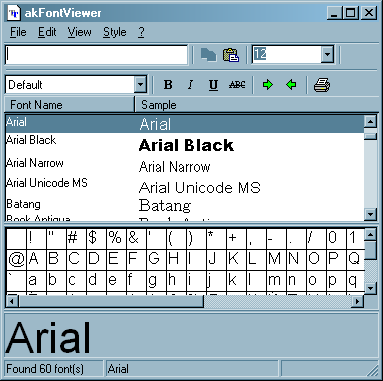
akFontViewer is a 32-bit utility that lets you view samples of all your installed fonts in Windows. It can show a list of fonts with each font rendered in its own typeface. Also a window much like a Character Map which is always active shows you which fonts have full character sets and which don’t. Other features enable you to define a sample text string, and to check off attributes you’d like to display such as bold, italic, underline, and strikeout. Print function is also supported.

Free Software
Free Text Formatting Tool – Download Dolphin Text Editor Menu
Dolphin Text Editor Menu is a free text formatting tool that adds to the functionality of the existing conventional text editors that are installed on your PC. Conventional text editors like notepad on Windows, do not have editing options, if present, would add great value. […]
Free Software
Download Simplyzip – Multi-Archive Program
Simplyzip is a multi-archiver program that supports numerous formats, including ZIP, ACE, CAB, RAR, TAR, GZIP, LZH, BZ2 etc. It has additional functions such as ACE/ZIP repair tool, file encryption/decryption, multi-ZIP spanning etc. Create RAR/ACE (new version) and LHA SFX […]
Free Software
Download Free Folder Comparison and Synchronization Tool – FreeFileSync
FreeFileSync is an Open-Source folder comparison and synchronization tool. It is optimized for highest performance and usability without restricted or overloaded UI interfaces. Select all file through drag and drop method. Last used configurations and screen settings are saved automatically. […]
Be the first to comment