
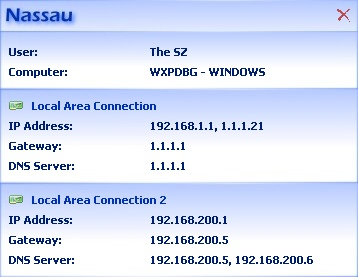
Nassau is a free portable tool which makes it easier to view your current network settings. If you need to find your current user name, workgroup/ domain name, IP address, gateway or DNS addresses, then, there’s no need to head off to the Computer window, or try to remember the appropriate Control Panel applet. Just hover your mouse over the Nassau system tray icon to reveal the core details, and double-click the icon to see everything else. And that really is just about it. There are no clever configuration options, no hidden capabilities or settings: it’s all very basic.

Free Software
Download FileExtractor – Recover Files From Binary Data Source
FileExtractor is a tool for recovering files from a binary data source such as digital cameras, partitions, harddrives, memory sticks or floppy disks. It works also on Linux partitions and image-files. It is possible to use the extractor itself or a wizard. […]
Free Software
Download ClearTweak – Change Contrast Setting of LCD in Windows XP
ClearTweak allows you to change the contrast setting of the ClearType setting for Windows XP. ClearType is designed to enhance LCD displays. It may appear slightly blurry on standard desktop monitors. It does not hurt to try ClearTweak on a CRT monitor. […]
Free Software
Download Kiwi Application Monitor – Monitoring Program for Windows
Kiwi Application Monitor is a monitoring program for Windows. It can monitor both applications and processes, allowing you to build up a library of information about that program’s system demands over a period of time. You can even apply a series of basic rules that can alert you […]
Be the first to comment