
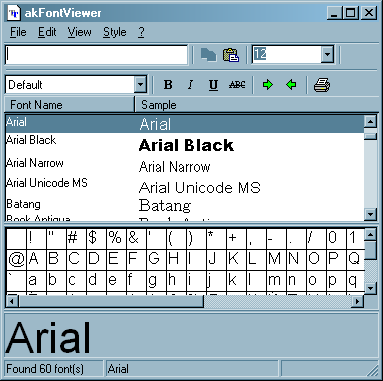
akFontViewer is a 32-bit utility that lets you view samples of all your installed fonts in Windows. It can show a list of fonts with each font rendered in its own typeface. Also a window much like a Character Map which is always active shows you which fonts have full character sets and which don’t. Other features enable you to define a sample text string, and to check off attributes you’d like to display such as bold, italic, underline, and strikeout. Print function is also supported.

Free Software
Microsoft’s Expression Encoder – Video Production Tool
Microsoft’s Expression Encoder is a versatile video production tool with several applications: it can carry out basic video editing, convert videos into formats ready for mobile devices or the web, capture activity on your PC desktop and save it to a movie and broadcast live video […]
Free Software
Neo Replace – Download Free Text Replacement Software
Neo Replace is free text replacement software to replace text in multiple files together. You can specify the text that you want to replace, and select the folder in which the files are present. It will then replace the text in all the files in that folder. […]
Free Software
Create Your Own Social Media Web Site – Elgg
Elgg is free social network builder’s list which allows you to create your own social media web site. You can build and see your web site grow with number of members and community users. It will help you to create feature rich web site for your community members where they can share ideas. […]
Be the first to comment