
Firefox 3: Save Tabs on Exit

Posted by Sree Pillai on December 21st, 2007 under category Browser
Topics: , ,

One of the features I love in Firefox 3 is prompting to save the open tabs on exit. This is really a great feature especially when you have a few tabs open which you want to browse through when you come back online.

When quitting Firefox 3, a warning window asks
Do you want Firefox to save your tabs for the next time it starts?, and a checkbox: Do not ask next time
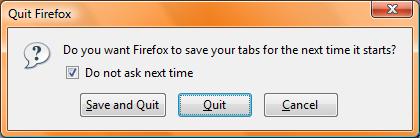

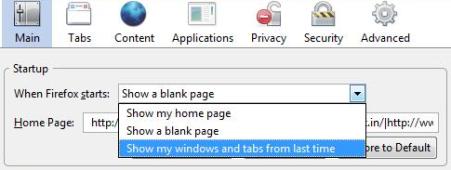
If you prefer not to ask next time and click Save and Quit, Firefox will never ask prompt you on quitting. Firefox updates your Startup settings (in Tools -> Options -> Main) to “Show my windows and tabs from last time“. (The startup option was available in Firefox 2 also.) Firefox saves the tabs automatically, without prompting you every time. To revert back to prompt before quitting, you can modify the startup settings.
If you opt not to ask next time and Quit, Firefox will never prompt you to save tabs. To turn on the prompting feature later, I did not find any settings in Firefox Options. Is it that I failed to notice it? I you know that, let me know.

Since I wanted to undo the checkbox, I manually had to edit the configuration preferences. Type about:config in the address bar and press enter. Firefox displays a warning message to make you causious about editing the config values. Once you agree, it lists all configuration parameters used by Firefox, which are editable. Now filter for browser.warnOnQuit and double click (toggle) on it to change the boolean value to true. True means the warning window will be displayed when quitting the browser.

BTW, you can also change the User Agent string to whatever you want. The default value for FF3.02b is Build identifier: Mozilla/5.0 (Windows; U; Windows NT 6.0; en-US; rv:1.9b2) Gecko/2007121120 Firefox/3.0b2. You can change it to any value you want and your name or company name to it. To change it, you need to add a new preference to the config file. Right click on the config window, select New -> String. Enter the preference name as general.useragent.override and the new User Agent value you prefer.

This will be the user agent name sent to the websites when you browse a website. You may use it for testing purpose. Applications like Gmail, which checks the browser version, may not work as desired if you entirely change the user agent information. To change it back, you can right click on the preference name and reset. To see the value of the user agent preference, type about: in address bar.

Email This · Share · Bookmark |Subscribe Feed|Subscribe Email

22 Responses to “Firefox 3: Save Tabs on Exit”

  1. Alex says:

    If browser.tabs.warnOnClose is set to false, Firefox won’t prompt you to save the session even if browser.warnOnQuit is true.

    So, either go into about:config and make sure browser.tabs.warnOnClose is true, or go into Tools:Options:Tabs and make sure “Warn me when closing multiple tabs” check box is checked (see Richard’s post above)

  2. Mark says:

    Thanks, Muz! Your solution fixed the problem. Cheers!

  3. webgyani says:

    @Muz Your solution worked perfectly, I tried all other solutions mentioned above, but nothing worked, but yours trick just did it for me, thanks dude thanks very much, much appreciated.

    cheers

  4. Muz says:

    Think i worked out a solution.

    Try changing the setting

    Tools -> Options

    In the startup panel, where it says: “When firefox starts:”

    Set that to “Show my windows and tabs from last time”

    click ok and close firefox

    Open firefox again

    Go that combo box again and now set the value to: “Show my home page”

    Click OK.

    close firefox… the Save and quit button should now appear

    that should do the trick

  5. kevin says:

    ok i figured it out . there is a add on called : “tab mix plus” . Install that.
    and when u go to options select the tab section . And there will be a button there called tab mix plus options click on it and then go to session tab and you can figured it out from there trust me a kid can . Hope this helps

    • Michelle says:

      This was driving me crazy. I had tried numerous solutions and yours was the only one that worked. I never would have thought to look at Tab Mix Plus options. Such an easy solution once you know. Thank you, Kevin!

  6. Evgeny says:

    Look at http://kb.mozillazine.org/Browser.startup.page. If you set Browser.startup.page to 3 in about:config, then Firefox will restore the session (tabs and their URLS) that existed before the exit, but it won’t ask if one wants to close multiple tabs.

    This at least works with FF 3.5.1 on Vista.

  7. Mike says:

    Thanks to Richard who posted:
    Tools:Options:Tabs – click into checkbox “Warn me when closing multiple tabs”
    I was having trouble finding this.
    Thanks for Sree for the post where I found the answer.
    Too bad Sree didn’t know the answer, or, if he did, he didn’t want to share.

  8. Dan Murray says:

    Awesome thanks! so simple how did I not see that!?!

  9. Billy says:

    How do I find the prefs.js file in Firefox 5

  10. asd says:

    in firefox 3 it’s browser.tabs.warnOnClose

  11. Kane says:

    Mike ….Thank You So Much ..Your tip Work 100% With me But Make Sure That is Firefox Close Before Do That Manually ON prefs.js File

    Thanx Again

  12. Mike says:

    To restore the warning tab go to
    about:config
    Look for
    browser.warnOnQuit
    Set it to true!!
    If that won’t work Got to you install location and find the prefs.js file and set it to this.
    user_pref(“browser.warnOnQuit”, true);

  13. mona says:

    thanks a lot every body
    i died it for my computer and it worked but my coworker has this problem and this sollution doesnt work for her.what shoud i do for her?

  14. Pieronda says:

    Hello everybody, I used to have the same problem, I solved it by setting “Show my homepage” in “When Firefox starts”. Now, everytime I quit Firefox (that is when I close the last window of the browser; in case of multilple windows open, only closing the last one will you will be prompted with the message) the old beloved “save and quit” message appears again.
    Obviously the option “Show my windows and tabs from last time” will make the message disappear again (as it is, infact, the option which is automatically selected when you tick “do not ask next time”).

    Hope I’ve been of help!
    Regards

  15. mona says:

    thanks for your information
    in my computer when i open multiple tabs, sometime i see “save and quit “and sometimes i dont see.what shoud i do?

  16. sunny says:

    Thanks for article. I did everything suggested but still have no warning when I quit Firefox. Thankfully it now saves Tabs as I set that in Options as described above. I got my version (3.0.1) off a computer magazine free cd and found that it never offered me the option of ‘Save and Quit’ when I closed FF. It’s a nice browser but annoyingly quirky in my experience of it.

  17. Newbie says:

    I must say the post is well researched and probably the closest I’ll come to an answer. However, I followed the manual config steps and still did not get the save and quit tab back. (Firefox does save my tabs automatically now because I have it set to do that in Options.) But, I want the “save and quit” prompt to come back anyway. I’ve searched all over Google trying to find a post with an answer and haven’t found it. It’s driving me nuts. If this were a Firefox User Group, I would suggest to Firefox to make it an option to be able to easily enable/disable the “save and quit” tab feature. I think a lot of people like to be prompted.

  18. Prabhu says:

    To Restore the prompt option follow the below steps

    The workaround to set Firefox to warn or ask for confirmation before closing window with multiple open tabs, or quit Firefox application, is to disable session restore by setting Firefox to start up with home page or blank page. To do so, click on Tools menu and then Options. In the Main tab Startup section, select Show my home page or Show a blank page for “When Firefox starts” option (Note that “Show my windows and tabs from last time” means session restore, which mean you won’t get any close tabs confirm warning).

    prathaprabhu

  19. [...] Try here: Firefox 3: Save Tabs on Exit – TECK.IN [...]

  20. Richard says:

    solved it!

    annoying but simple, set the options as follows:

    Tools:Options:Main – When Firefox starts – SHOW HOME PAG
    Tools:Options:Tabs – click into checkbox “Warn me when closing multiple tabs”

    This should sort it – did for me anyway.

  21. Forrest says:

    Thanks for the informative post. Somehow I managed to lose the save tabs dialog on FF3 rc1 and boy did I miss it. I am glad to see it in FF now too. Before I had to use the Save Session plugin.

Leave a Reply

All comments are moderated, and spam comments are automatically deleted.

Article URI: http://teck.in/firefox-save-tabs-on-exit.html
Author Email: sree@teck.in