Chikka Messenger to Send Free SMS Text Messages

Posted by Sree Pillai on September 16th, 2006 under category SMS, Web 2.0
Topics: , , ,

Indiatims Chikka Messenger

Chikka Messenger is the first two-way PC-to-mobile instant messaging client. Chikka Messenger provides free instant messaging to online friends and to mobile phone users. Chikka is brought to India by Indiatimes.com.

Send Free SMS
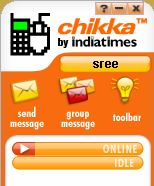
chikkaUse the Chikka Messenger to send text messages directly to mobiles around the world. When your friend receive a reply, they can simply hit reply to send messages directly back to your computer. Chikka Messenger supports up to 320-character long SMS messages.

Mobile Message Forwarding: If you register your mobile number as your Chikka ID, messages sent to you – both SMS and instant messages – follow you to your phone when you are away or logged off.

Now you can add your Google Talk buddies to Chikka. That means, you can even receive incoming Google Talk messages on your mobile when you’re away from your PC.

Download Indiatimes Chikka Messenger. To use the Chikka Messenger, you need to register with your mobile number.

Supported Networks in India

Indiatims Chikka Messenger Supported NetworksIndiatimes Chikka Messenger connects to all major Indian mobile carriers including Aircel, Airtel, BPL Mobile, BSNL, Vodafone, Idea, MTNL, Reliance Telecom, Riliance Mobile, Spice Telecom and Tata Indicom.

I use my reliance mobile number and it worked perfectly. Instantly received the password on my cell phone and was able to login with it.

You can send and receive messages from your friends mobile. To reply to messages received, simply reply with your message and send like any normal SMS message.

Register for a Chikka ID from Your Mobile Phone
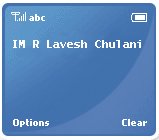
Register for ChikkaBefore you can use Chikka, you will need to register to get a Chikka ID. On your mobile phone, send an SMS to 58888.

IM R [your name] and send to 58888

You’ll receive your temporary password through SMS. Once you do, you’re ready to use Chikka Messenger. Now you can launch the Chikka Messenger application from your computer and login with your Chikka ID, which is your mobile phone number, and password.

Cost of Sending and Receiving Messages

When Registering for a Chikka account or sending a message using your mobile phone will cost you regular value-added service rates. In India, the value added service rate is as follows:

  • For Aircel, Airtel, Vodafone, RIM, RTL, BPL, TTSL and Idea mobile subscribers, the rate is Rs 3.00 per SMS sent.
  • For BSNL mobile subscribers, the rate is Rs 1.50 per SMS sent.
  • For MTNL mobile subscribers, the rate is Rs 1.00 per SMS sent.

In India, receiving messages from Chikka on your mobile phone is free!

Sending and Receiving Messages
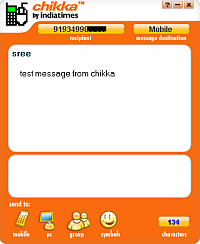
sending chikka messageTo send a message from your mobile phone, check your list of buddies by texting the IM C to 58888. Note the buddy digit and you can send the message to the buddy by texting IM <buddy digit> <message>.

You can send an plain email to your friend by texting IM TXT <email address> <message>.

To reply to a Chikka message you have received on your mobile phone, there is no need to remember any short codes or keywords. Chikka’s intuitive system allows you to simply reply to the message you received, as if you are replying to a regular text message. The message will be delivered directly to your friend’s Chikka chat window.

Message Credits

A PC user is given only limited credits for sending messages from the computer to mobile phones. The daily message credit allocation depends on the wireless provider of your recipients. Your daily message credit allocation applies to SMS and MMS collectively. Credits not used during the day are not carried over to the next day.

If you have run out of message credit, you can wait for a mobile user to reply to your message so that you’ll regain a credit. Otherwise, you can wait 24 hours from the first time your account was active for the day to receive your daily message credits.

Country – Telecos Credits per day Credits earned from each reply
Philippines – All Telcos 30 2
India – All Telcos 10 1
United States – All Telcos 20 1
United Kingdom – All Telcos 30 1
Guam – Guamcell Unlimited 1
Saipan – Saipancell Unlimited 1
Spain – All Telcos 30 1
Thailand – DTAC 30 1

Blocking and Unblocking

When someone adds you to his buddy list for the first time and sends you a message on your mobile phone, you can easily block the sender by replying to the text message with the keyword BLOCK.

Otherwise, create a text message and key in IM B then send it to 58888.

To unblock someone, create a text message and key in IM UB then send it to 58888.

Mobile Keyword Commands

Here’s a quick guide to some important mobile commands.

Keywords Description Send To
IM R <your name> To register 58888
IM C To see who is online and instructions to send a message
IM <buddy digit> <message> To send a message to a buddy
IM P To get your password
IM ADD <mobile phone number> To add a buddy
IM TXT <email address> <message> To send a message to an email address
IM B <Chikka ID> To block someone in your buddy list
IM UB <Chikka ID> To unblock someone
IM HELP To get help info
IM QUIT To never receive messages from anyone

Chikka Text Messenger on the Web

Chikka Messenger installer works only on Windows operating system. If you are using Mac or Linux you can try the web version.

If are not allowed to install applications at your school, college or office, you can still access Chikka through your web browser.

Visit indiatimes.chikka.com and click on Launch Chikka Javalite to launch the browser based chikka messenger on the web.

Email This · Share · Bookmark |Subscribe Feed|Subscribe Email

52 Responses so far

  1. Naveen Vaduri:

    Thank you Mr. Sree. Your article was very well written and very informative. It provided an easy and economical way to contact my family and friends in India.

    Thank you once again…

  2. Gudia:

    hello mr shree, thanks for the information.somehow i was not very clear abt the rates…can u tell me if i send sms from my pc to my friends phone than what the charges are? and if my firned reply me what the charges are?
    thanks

  3. Sree Pillai:

    SMS from Chikka messenger is free, if it works for your cell number/provider.

  4. manish:

    Hi,
    I tried sending the message to 8888, but it only returned an error stating “please resend using valid 10 digit number.
    what should I do?
    my carrier is Cingular(USA).
    thanks,
    manish.

  5. Sree Pillai:

    Hi Manish,
    it works for me from India, please try again there. Please check the website and see if your career is supported.
    http://indiatimes.chikka.com/

  6. Anonymous:

    hi mr. sree

    i just wanted to say that i found that i can log into my chikka account from my mobile phone if i enter the wap site tjat.com .
    they are usually working with msn and icq and yahoo and now they let you log in to your chikka account.
    i love chikka, i can talk to my family in manila easily.
    i believe that chikka users from India will find it usefully as well

  7. Sree Pillai:

    thanks anon for sharing the info with us.

  8. Annihilator:

    My friend’s aircel mobile is not receiving my messages..
    Another of my friend using Airtel receives my messages but is not being able to reply to it…
    please tell me what the problem is…

  9. shankar:

    chikka is fine but long messages it sends erratically with time delay and broken,sometimes the receiver has to phone me back to clarify the message!once a while it delivers inthe middle of the night though you send it in the evening!

  10. Erick:

    Try the new chikka web messenger! No need to download!

    http://new.chikka.com

  11. Chikka X Messenger - Web Based Free Text Messages « TECK.IN:

    [...] X Messenger – Web Based Free Text Messages In 2006 we wrote about Chikka Messenger from Indiatimes.com to send free text messages from PC to mobile [...]

  12. Rafeek:

    i want to send sms to mobile phones using chikka X messenger

  13. hiro:

    Hello, thank you for your information.
    I have a question.

    > Otherwise, you can wait 24 hours from the first time your account was active for the day to receive your daily message credits.

    Is this true?
    for example, if I run out of my credits at 11pm, do I have to wait until 11pm on the following day?
    Isn’t 6am or so enought? not to say 12mid..?

    Please tell me if anyone knows when we can get following day’s 30 credits.

    Thank you.

  14. no name:

    if i send a msg i knw it wld b free for me but wat abt the recipient does he hav to pay a cost?

  15. Sree Pillai:

    the recipient do not have to pay.

  16. HITESH RAMCHANDANI:

    Chikka is not able to send sms to india :twisted: ie to reliance 8 digit , mtnl 8 digit nos and the nos of airtel starting from 9867 or 98921. :oops:
    If you try to send SMS to Airtel (Mumbai) 9867. :oops: The reply comes that we are upgrading our services pls bear with us.

  17. AAKASH HINDUJA:

    Chikka is not able to send sms to india ie to reliance 8 digit , mtnl 8 digit nos and the nos of airtel starting from 9867 .If you try to send sms to airtel(mumbai) 9867…… . The reply comes that we are upgrading our services plz bear with us .

  18. pavan:

    Chikka is not able to send sms to india ie to reliance 8 digit , mtnl 8 digit nos and the nos of airtel starting from 9867 .If you try to send sms to airtel(vizag) 9867…… . The reply comes that we are upgrading our services plz bear with

  19. manju:

    Hi,

    looking for free sms to be sent over mobile from pc. the msg with more characters 135 and above.

  20. kuma:

    for manju

    r u asking us?
    so chikka will do.

  21. manish:

    its very good

  22. chinnu:

    chikka is very best messenger having 135 above characters

  23. Kumar:

    Hey, Can anybody tell me how i can use this chikka from my metro pcs in US? i tried to register my phone no. but it’s not. Please help me, my email: blueking2k5@gmail.com. Try sending sms to my phone 4045738412

  24. manu:

    i tried sending sms to a non chikka member from my PC.bt my friend did not receive my sms..i registered through my mobile and got an id and password.now can i send message from my mobile to another non chikka member..if so how?

  25. jhigs:

    hi mr. sree, i just want to ask if there is any application for chikka to install in any mobile device, i really love chikka cause i found it very usefull. thanks a lot..

  26. Anand Ashtekar:

    i am not able to connect with chikka :sad: .

    error message shown to me again & again process timed out please relogin.

  27. Neel:

    I m very sad because i m not sending any sms to my frnds plz help me

  28. theflaw:

    i do sending chikka through mobile.. no need to down load..

  29. largz:

    why is i cannot connect when open my id in chikka.com!
    i have correct log-in,i dont know it was show incorrect!

    thank you for considering my letter!!

    largz

  30. vanni:

    Im just a bit confused..In my house I am able to log in at chikka web and its working..but in the office it somehow says that chikka is undergoing a maintenance..could it be possible that it is only here in office?

  31. Hiro:

    hello can som1 tel me how to use Chikka? i tried to add and send it doesn’t work .. plz help me , Thanks . ..

  32. Amanda:

    WHEN I TRY SENDING MY MESSAGE TO 8888 IT SAID MESSAGE FAILED. IM A METRO PCS. DOES IT WORK FOR METRO?

  33. Sree Pillai:

    Use 58888 for Chikka/Indiatimes.

  34. Amanda:

    Yea i tried that it still said Message Failed. Is this only for India???

  35. Amanda:

    I have the same problem as Kumar

  36. Sree Pillai:

    Hello Amanda, yes, 58888 works only from India for India Times. :sad:

  37. Amanda:

    Aww that stinks. Well can you try to make one for the US? And if you cant, can you find a free site that lets you IM for free for metro? im having trouble looking for that. Thanks

  38. Sree Pillai:

    @Amanda, please go though the page http://teck.in/topic/free-sms and find the best one that’s good enough for you.

  39. Amanda:

    :grin: I just got aim mobile. But thank you for helping me out :) if i have anymore questions i will ask you :)

  40. saranya:

    I want to send sms through my internet to my frien mobile….it is an aircel mobile

  41. hiro:

    does anyone still have a problem on Chikka?
    Chikka have been improved recently.
    hope all of you are using it without problems.

  42. chel:

    I have problems on my chikka, so I uninstalled and reinstalled again but still does’nt working right. And I tried the javalite once but it says that my browser would not recognized the chikka javalite launch.

  43. shivratan gupta:

    sir
    i have send u a sms to register n also by chikka.com site bt reply come phone provider not supported bt why?????????

    i m using Airtel survice n it is supported plz reply me

    thanks regarded

  44. melody:

    please how can i register to chikka messenger because the password that copmuter gave me doesnt working?thanks

  45. melody:

    please how can i register to chikka messenger because the password that computer gave me doesnt working?thanks

  46. she:

    If i’m going to use my chika to somebody abroad how much is the cost if he has to reply me at my pc, using his roaming number?

  47. Varun:

    Hi friends….. I tried to register for this service using the shortcode given on the website but it says wrong code used……

    I’m using Airtel in Maharashtra any help would be much appreciated brother

    Regards

    Varun

  48. Wyr3d:

    I’m having a problem with Chikka lately. Sometimes when I recieve a message, all I get it a mix of numbers and letters, and not what the sender wrote. What gives?

  49. Dadd:

    Hello Guyz, I’ve been using ChikkA text for almost a couple of years, I can send messages to different network in our country – thumbs UP for Chikka text …

    Dadd

  50. Dadd:

    Hello Guyz, I’ve been using ChikkA text for almost a couple of years, I can send messages to different network in our country – thumbs UP for Chikka text …

    PEACE,

    Dadd

  51. gin:

    when will chikka be available in australia?

  52. wendell camacho:

    how to identify who is the sender of my chikka?the chikka services is use sometimes for annoying and brothering in my cellphone,,pls.. give me how to identify who is the sender?

Have Something to Say?

All comments are moderated, and spam comments are automatically deleted.

Article URI: http://teck.in/chikka-messenger-to-send-free-sms-text.html
Author Email: sree@teck.in